The on-call number and fault reporting visible on every page. A report with location and photo, without hunting through menus.
Industries · Public sector
Web portals for public utilities, municipalities and institutions
Citizens don’t visit a utility’s website to admire the design. They come to report a fault, check whether there is water, find a form or pay a bill — and they should be able to do it in a minute, from a phone.
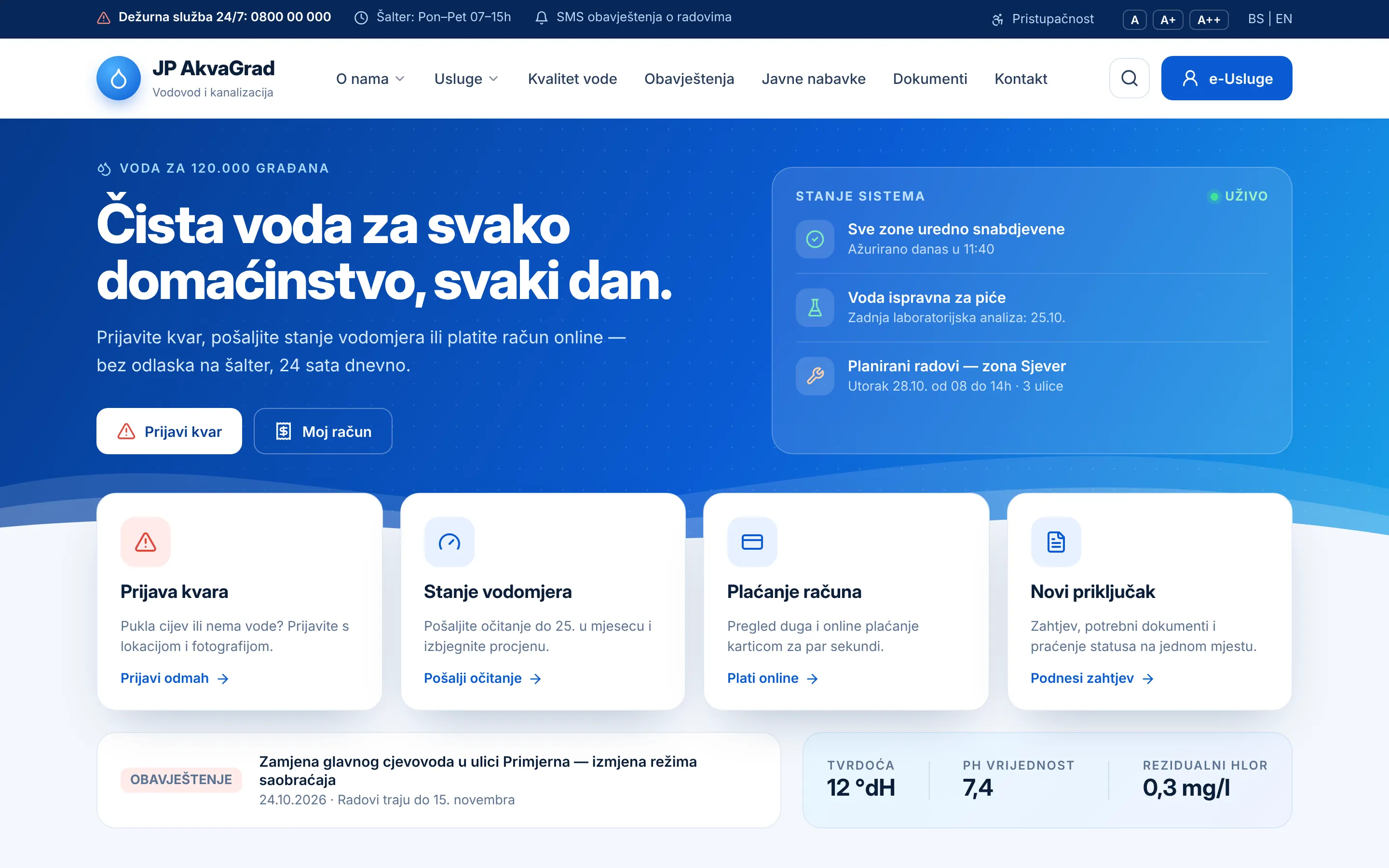
Home page concept · public water utility
Priorities
What a good utility portal needs
The goal: fewer calls to the counter and the phone, more requests resolved online — with the transparency citizens rightly expect.
Planned and emergency works by zone and street, with date and duration — at the top of the home page, not buried in a news archive.
Meter readings, bill overview, connection requests or forms — online, with clear instructions and the required documents.
Procurement, reports, decisions and tariffs clearly organised and easy to search, as citizens and regulations require.
Contrast, text size, keyboard navigation and a structure suited to screen readers — following WCAG 2.1 AA.
A lightweight site that opens on an older phone and slow mobile internet — exactly when there is a fault and it’s needed most.
Concept
About the concept in the picture
The concept at the top shows what the home page of a municipal water utility could look like. Everything important is on the first screen:
- A bar with the on-call number, counter opening hours and accessibility options (larger text).
- Real-time “system status” — whether all zones are supplied, water quality and planned works. That is the information most citizens open the site for.
- The four most common actions right below: report a fault, submit a meter reading, pay a bill and request a new connection.
- Water quality parameters and notices, for transparency and trust.
Every portal is designed around the real services and processes of the utility or institution — the concept shows the approach, not a ready-made template.
Security and maintenance
Technical requirements a portal must meet
A public utility's portal is a public service: it must run reliably, be secure and stay maintainable when management or suppliers change. That's why I insist on a few principles:
- Security first — HTTPS, minimal third-party add-ons, protected forms and regular security checks.
- Personal data protection — forms collect only what a request needs, with a clear privacy notice.
- Ownership and documentation — the institution receives the source code, access credentials and documentation, with no lock-in to one supplier.
- Measurable speed — Core Web Vitals in the green, including for users on mobile networks.
If you already have a portal that is slow or outdated, the first step can be a technical audit — so you know what really needs to change before a new tender is published.
FAQ
Frequently asked questions
Do you work on projects procured through public tenders?
Yes. Public sector projects follow public procurement rules: they are built to the technical specification in the tender documentation, with clearly defined deadlines, deliverables and documentation.
What does it mean for a portal to be accessible?
That it can be used by people with visual, hearing or motor impairments and by older people: sufficient contrast, readable text, keyboard navigation, image descriptions and correct structure for screen readers. I use the European standard WCAG 2.1 level AA as the benchmark, which is mandatory for public sector websites in the EU.
Can staff publish notices and documents themselves?
Yes — for institutions that is essential. Works notices, public calls and documents are published through a simple admin interface, without needing a developer for every change.
You might also find useful
-
Technical consulting and audits
Audits of speed, SEO and security, speeding up slow websites and independent advice on technology and vendors.
Learn more -
Web apps and automation
Internal tools, dashboards, automated reports and system integrations — Python and JavaScript solutions that save hours of work.
Learn more -
Public procurement
How to write a technical specification for a website tender
For institutions and utilities: specification structure, acceptance criteria and the most common mistakes.
Read the guide -
Accessibility
Website accessibility (WCAG): what it is and how to check it
WCAG 2.1 AA explained simply, plus a check you can do yourself in 15 minutes.
Read the guide -
Speed
Why is my website slow — and how to speed it up
How to measure speed (LCP, INP, CLS), the most common causes and concrete steps to speed up your site.
Read the guide -
Data protection
Bosnia’s new data protection law: what your website needs
Privacy policy, cookies, forms and analytics — a practical checklist for compliance.
Read the guide
Contact
Have a project in mind? Let's talk.
Describe your idea in a few sentences. I'll reply personally within 24 hours on business days, with clear next steps.
Emailinfo@engimotive.com
LocationZenica, Bosnia and Herzegovina
Working modeRemote — Europe and worldwide
What happens next: a reply with a few questions → a short call → a fixed quote. No obligation.